

Credits, Plans & Modes
← Projects, Shots & Renders · User Guide · Next: Render Video workspace →Credits
Credits are the unit of cost in Mago. Every render in Credits mode consumes credits. The exact cost depends on the model and the settings. What increases credit cost:- Higher resolution (longest side).
- More steps (inference depth).
- More frames in the render range.
- Higher frame rate (60 fps costs more than 24 fps for the same duration — more frames).
- Larger context size and overlap for chunked renders.
- ControlNet usage and higher ControlNet resolution.
💡 Tip — The Generate button always shows the credit cost before you submit. Adjust settings to fit your budget.
🎉 Promotional discount — Mago native video models (Transform, Style Transfer, Character, Inpaint, Masking, Creative Upscaler, Upscaler) currently have a 30% price discount applied automatically. Closed-source models (Kling, Seedance, Happy Horse) and image models are not affected. The displayed credit cost already reflects the discount.
Credits mode
The default mode. Each render consumes credits from your balance. Maximum frames per render are higher than in Relaxed mode. Available on every plan.Relaxed mode
Render without consuming credits, subject to plan limits. Useful for experimentation, learning, or low-stakes work.
Relaxed mode is restricted to Mago models:
- Mago Transform · Mago Style Transfer · Mago Character · Mago Inpaint
- Mago Masking · Mago Creative Upscaler · Mago Upscaler
⚠️ Warning — Closed-source models (Kling, Seedance, Happy Horse) and image models always consume credits, even in Relaxed mode.
Plans
Switch plans via Pricing in the top bar. Monthly and yearly billing are available; yearly typically includes a ~20% discount.
Credit packs
One-time top-ups for users who want to add to a plan, or buy credits without a subscription. Larger packs have a steeper per-credit discount.The queue
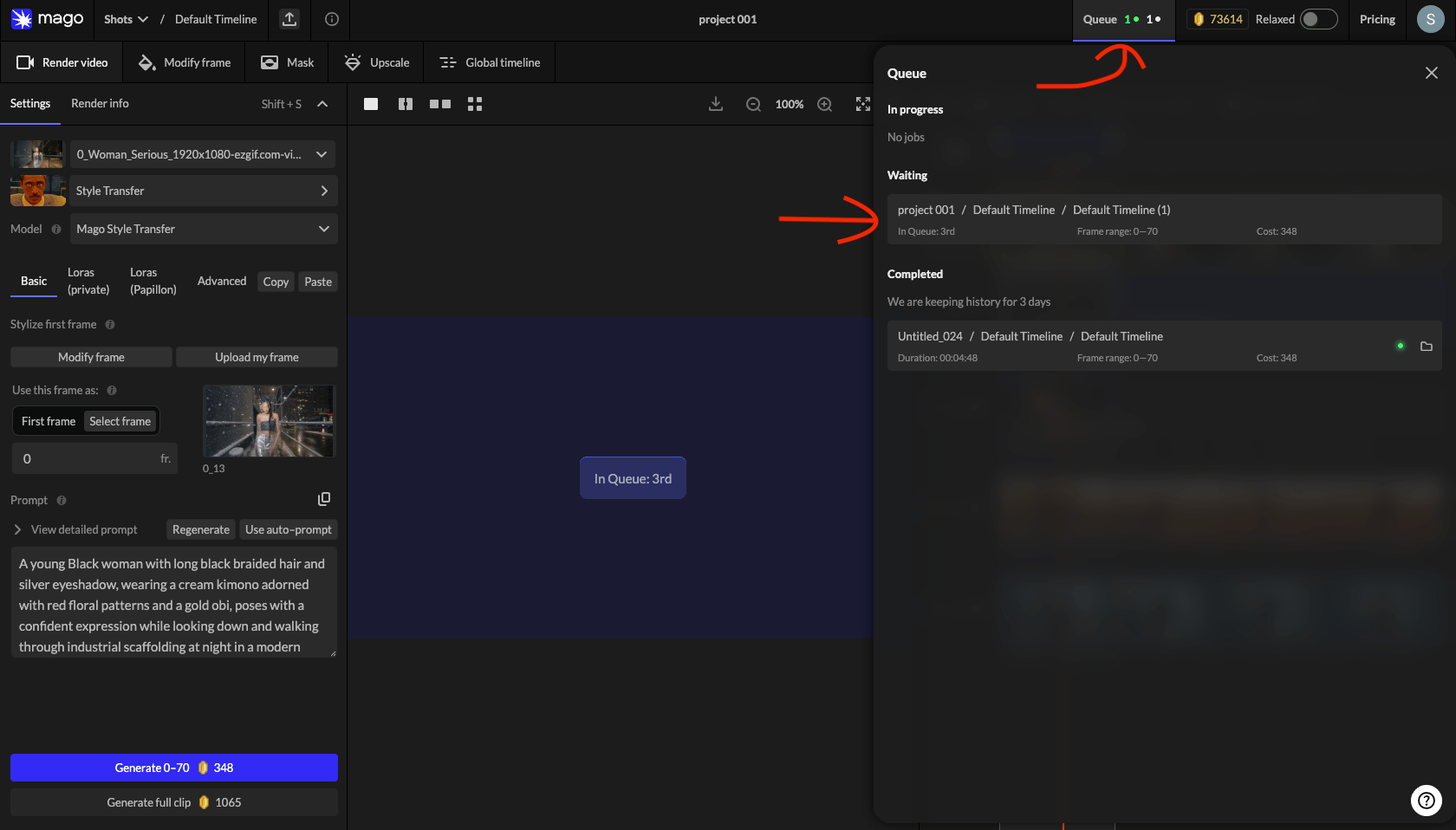
Renders submitted in Relaxed mode or during GPU saturation wait in a queue. The top-bar counter shows in-progress, waiting, and recently completed renders.
Each queue entry shows project, shot, render name, duration, frame range, and credit cost. Click an entry to navigate to that render.
⚠️ Refunds — Renders that take multiple hours almost always indicate an error. Contact support to request cancellation, refund, and re-rendering. See Troubleshooting → render time.
Billing & payments
- Payments are processed by Stripe.
- Cancel anytime.
- Supported methods: Visa, Mastercard, UnionPay, and other major cards.
- Billing history and invoices: click your profile icon (top-right) → Billing info.
← Projects, Shots & Renders · User Guide · Next: Render Video workspace →