> ## Documentation Index
> Fetch the complete documentation index at: https://docs.mago.studio/llms.txt
> Use this file to discover all available pages before exploring further.
# Mask
# Mask Workspace
[← Modify Frame](/guide/workspaces/modify-frame) · [Workspaces](/guide/overview#the-five-workspaces) · [Next: Upscale →](/guide/workspaces/upscale)
***
The Mask workspace generates masks — definitions of which parts of a video get edited and which stay intact. Masks are used primarily by [Mago Inpaint](/models/mago-video-models#mago-inpaint), but can also be downloaded for external compositing.
## When to use masks
Mask-based editing fits when:
* Only a specific element needs to change (a character's shirt, a single prop, the background only).
* The rest of the video must be preserved exactly.
* Repeated targeted edits are needed (mask once, apply many times).
> **⚠️ Warning** — Don't use a mask when the *entire* frame needs to transform. Use [Mago Transform](/models/mago-video-models#mago-transform) or [Mago Style Transfer](/models/mago-video-models#mago-style-transfer) instead.
## Mask generation modes
| Mode | How it works | When to use |
| -------------------- | ------------------------------------------------------------------- | --------------------------------------------------------------------- |
| **Prompts** | Text describes the element, e.g. *"red car"* or *"main character"*. | Quick masking when the element is easy to describe. |
| **Points** | Click the frame to mark areas with positive/negative points. | Precise selection of irregular shapes, or when prompts are ambiguous. |
| **Prompts + Points** | Combine both — prompts coarse, points refine. | Most reliable for complex scenes. |
## Points editor
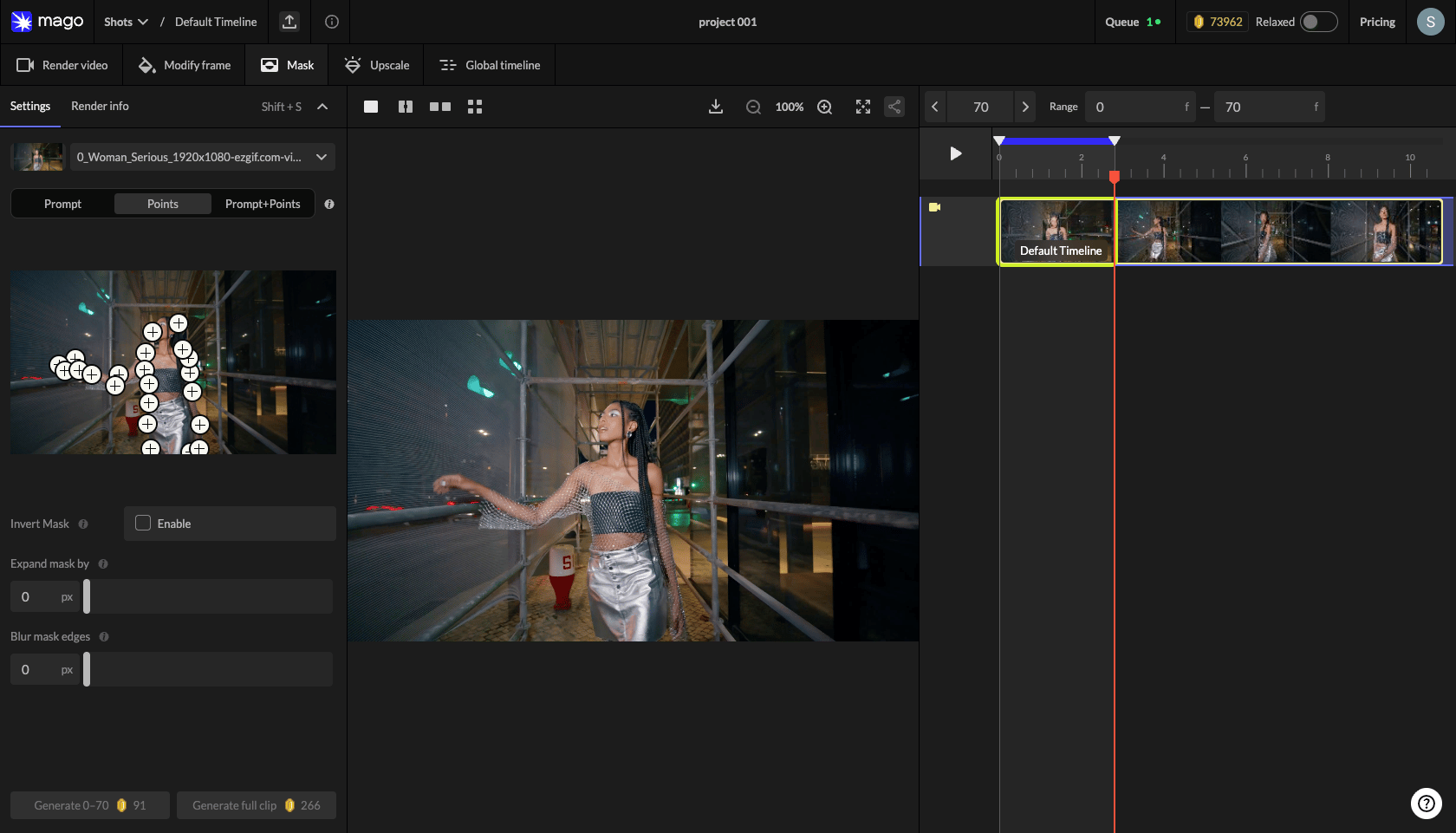 1. Click the **Points** selector to open the editor.
2. Switch to **Add** mode and click to mark areas *inside* the mask.
3. Switch to **Remove** mode to mark areas *excluded* from the mask.
4. Click any placed point to delete it individually.
5. Use **Clear All** to start over.
6. Switch frames if needed — the visual selection is anchored to the chosen frame. (Selection on any frame is being rolled out.)
## Settings
| Setting | Tooltip | Default | Range |
| --------------- | -------------------------------------------------------------------------------------------------------------------------------------- | -------- | ------ |
| Invert mask | The white area shows the part that will be changed. Invert to select the background: mask the subject first, then enable Invert. | Disabled | On/Off |
| Expand mask by | Expands the mask boundary outward by the specified number of pixels. Increase if the mask is cutting off edges of the detected object. | 0 | 0–50 |
| Blur mask edges | Softens the mask edges by applying a blur. Higher values create smoother, more feathered edges. | 0 | 0–50 |
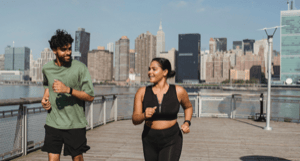
#### Invert mask — example
| Prompt: Person | Inverted mask (background selected) |
| ------------------------------------------------------------------------------------------------------------------------------------------------------------------------------------------------------------------------------------------------------------------------------------------------------------------------------------------------------------------------------------------------------------------------------------------------------------------------------------------------------------------------------------------------------------------------------------------------------------------------------------------------------------------------------------------------------------------------------------------------------------------------------------------------------------------------------------------------------------------------------------------------------------------------------------------------------------------------------------------------------------------------------------------------------------------------------------------------------------------------------------------------------------------------------------------------------------------------------------------------------------------------------------------------------------------------------------------------------------------------------------------------------------------------------------------------------------------------------------------------------------------------------------------------------------------------------------------------------------------------- | ----------------------------------------------------------------------------------------------------------------------------------------------------------------------------------------------------------------------------------------------------------------------------------------------------------------------------------------------------------------------------------------------------------------------------------------------------------------------------------------------------------------------------------------------------------------------------------------------------------------------------------------------------------------------------------------------------------------------------------------------------------------------------------------------------------------------------------------------------------------------------------------------------------------------------------------------------------------------------------------------------------------------------------------------------------------------------------------------------------------------------------------------------------------------------------------------------------------------------------------------------------------------------------------------------------------------------------------------------------------------------------------------------------------------------------------------------------------------------------------------------------------------------------------------------------------------------------------------------------------------------------------------- |
|
1. Click the **Points** selector to open the editor.
2. Switch to **Add** mode and click to mark areas *inside* the mask.
3. Switch to **Remove** mode to mark areas *excluded* from the mask.
4. Click any placed point to delete it individually.
5. Use **Clear All** to start over.
6. Switch frames if needed — the visual selection is anchored to the chosen frame. (Selection on any frame is being rolled out.)
## Settings
| Setting | Tooltip | Default | Range |
| --------------- | -------------------------------------------------------------------------------------------------------------------------------------- | -------- | ------ |
| Invert mask | The white area shows the part that will be changed. Invert to select the background: mask the subject first, then enable Invert. | Disabled | On/Off |
| Expand mask by | Expands the mask boundary outward by the specified number of pixels. Increase if the mask is cutting off edges of the detected object. | 0 | 0–50 |
| Blur mask edges | Softens the mask edges by applying a blur. Higher values create smoother, more feathered edges. | 0 | 0–50 |
#### Invert mask — example
| Prompt: Person | Inverted mask (background selected) |
| ------------------------------------------------------------------------------------------------------------------------------------------------------------------------------------------------------------------------------------------------------------------------------------------------------------------------------------------------------------------------------------------------------------------------------------------------------------------------------------------------------------------------------------------------------------------------------------------------------------------------------------------------------------------------------------------------------------------------------------------------------------------------------------------------------------------------------------------------------------------------------------------------------------------------------------------------------------------------------------------------------------------------------------------------------------------------------------------------------------------------------------------------------------------------------------------------------------------------------------------------------------------------------------------------------------------------------------------------------------------------------------------------------------------------------------------------------------------------------------------------------------------------------------------------------------------------------------------------------------------------- | ----------------------------------------------------------------------------------------------------------------------------------------------------------------------------------------------------------------------------------------------------------------------------------------------------------------------------------------------------------------------------------------------------------------------------------------------------------------------------------------------------------------------------------------------------------------------------------------------------------------------------------------------------------------------------------------------------------------------------------------------------------------------------------------------------------------------------------------------------------------------------------------------------------------------------------------------------------------------------------------------------------------------------------------------------------------------------------------------------------------------------------------------------------------------------------------------------------------------------------------------------------------------------------------------------------------------------------------------------------------------------------------------------------------------------------------------------------------------------------------------------------------------------------------------------------------------------------------------------------------------------------------------- |
|  |
| 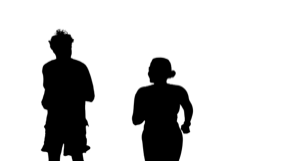 |
The white area is what gets edited. To change the background while leaving the subject intact: mask the subject with a prompt, then enable **Invert mask**.
## Mask tracks
Mask renders appear in a dedicated timeline that shows only mask tracks in this workspace. Each mask track can be:
* Used as input to Mago Inpaint in Render Video.
* Downloaded for external compositing software.
* Compared with the source via slider or side-by-side.
## Recommended practice
1. Always run a few test masks before committing to a render.
2. Use the comparison slider to verify coverage against the source.
3. If the mask is too tight, increase **Expand** by 5–10 px.
4. If edges look hard in the final result, increase **Blur**.
5. For multi-element scenes, use **Prompts + Points** for highest reliability.
> **📐 Pixel fidelity** — Mago Inpaint, like virtually every video model, does not operate in pure pixel space. Unmasked regions can shift slightly (brightness, color) due to compression during processing. For pixel-perfect preservation: download the mask, run the Inpaint render, then composite the result against the original source in DaVinci, After Effects, or Fusion using the downloaded mask. See [Export & compositing](/guide/export-and-compositing#mask-export).
***
[← Modify Frame](/guide/workspaces/modify-frame) · [Workspaces](/guide/overview#the-five-workspaces) · [Next: Upscale →](/guide/workspaces/upscale)
|
The white area is what gets edited. To change the background while leaving the subject intact: mask the subject with a prompt, then enable **Invert mask**.
## Mask tracks
Mask renders appear in a dedicated timeline that shows only mask tracks in this workspace. Each mask track can be:
* Used as input to Mago Inpaint in Render Video.
* Downloaded for external compositing software.
* Compared with the source via slider or side-by-side.
## Recommended practice
1. Always run a few test masks before committing to a render.
2. Use the comparison slider to verify coverage against the source.
3. If the mask is too tight, increase **Expand** by 5–10 px.
4. If edges look hard in the final result, increase **Blur**.
5. For multi-element scenes, use **Prompts + Points** for highest reliability.
> **📐 Pixel fidelity** — Mago Inpaint, like virtually every video model, does not operate in pure pixel space. Unmasked regions can shift slightly (brightness, color) due to compression during processing. For pixel-perfect preservation: download the mask, run the Inpaint render, then composite the result against the original source in DaVinci, After Effects, or Fusion using the downloaded mask. See [Export & compositing](/guide/export-and-compositing#mask-export).
***
[← Modify Frame](/guide/workspaces/modify-frame) · [Workspaces](/guide/overview#the-five-workspaces) · [Next: Upscale →](/guide/workspaces/upscale)